
The right Amazon wholesale seller tool stack saves margin before mistakes appear. Amazon Wholesale sellers often find themselves losing money in spreadsheets rather than in Seller Central.
By the time a loss appears on the dashboard, whether it’s due to stuck inventory, squeezed margins, or a lost Buy Box, the decision that led to it was made two months ago during a sourcing review. The numbers may have looked good on the screen, but crucial data was missing.
In the wholesale industry, visibility is everything when it comes to margins. The right tools can help you spot losses before they hit your bank account, while the wrong ones force you to sift through your P&L to figure out what went wrong. This guide goes beyond generic ‘all-in-one’ tools to map out the exact, amazon wholesale seller tools needed to scale from pre-launch to $100K+ in monthly revenue in 2026.
What you’ll find in this guide
- Phase 1 – Pre-launch (pre-revenue)
- Phase 2 – $0 to $10,000/month
- Phase 3 – $10,000 to $30,000/month
- Phase 4 – $30,000 to $100,000/month
- Phase 5 – $100,000+/month
- The tool stack at a glance (visual reference table)
- Seven mistakes wholesale sellers make with their tool stack
- Frequently asked questions
Why Your Amazon Wholesale Seller Tool Stack Matters
Wholesale and private-label businesses operate quite differently, which means that tools designed for one model can create confusion and unnecessary expenses for the other.
When it comes to wholesale sourcing, there are four key activities to focus on:
- Validate demand and ensure price stability before making any financial commitments.
- Identify brands where a new FBA seller can still hold their ground.
- Scan supplier files on a large scale to uncover profitable SKUs.
- Monitor the actual per-unit margin from each supplier before any payments are made.
Each of these activities has a dedicated tool tailored to it. The phases outlined below connect those tools to the revenue stage, where they justify their costs.
Phase 1 – Pre-launch: ~$40/month
Keepa + SellerAmp Getting Started
Before sending out the first order, two key questions guide every choice:
- Is the price of this product stable enough to make a purchase?
- And what’s the real margin after all the fees?
Keepa provides insights into price history, BSR trends, and Buy Box ownership data from previous years. Meanwhile, SellerAmp tackles the second question by calculating ROI, FBA fees, and the maximum buy cost in just seconds for any product, on any website, all without the hassle of switching tabs. Both tools offer free trials, making it easy to get started.
The total cost at this stage is around $40 a month.
Phase 2 – $0 to $10,000/month: ~$77/month
Add: SellerAmp Getting Serious ($27.95/mo) + DS Amazon Quick View (Free) + SmartScout Basic ($29/mo)
As your sourcing volume increases, it’s time to upgrade SellerAmp to Getting Serious for unlimited lookups. DS Amazon Quick View is a handy free Chrome extension that reveals BSR, the number of FBA sellers, review counts, and Buy Box prices right on Amazon’s search results pages, no need to click into individual listings. SmartScout Basic helps you sift through 1.5 million Amazon brands using key metrics for wholesale, like an Amazon in-stock rate under 10% and fewer than four FBA sellers per listing. One session with SmartScout can save you hours of tedious category browsing.
The total cost at this stage is around $77 a month.
Phase 3 – $10,000 to $30,000/month: ~$185 to $215/month
Add: Sellerboard Standard ($19/mo) + Upgrade SmartScout to Essentials ($97/mo) + Supplier File Scanner ($19 to $49/mo)
At this stage, sales started picking up. This is the moment when Sellerboard steps in to track per-unit margins. to help with wholesale tracking per-unit margins across various suppliers with fluctuating COGS. It also helps catch those FBA reimbursements and provides a P&L overview that SellerAmp’s per-product calculator just can’t match at the account level. At this stage, supplier files start pouring in. That is where tools like Supply Spy and RocketSource come in. Both pay for themselves on the first supplier file they process.
The total cost at this stage is between $185 to $215 a month.
Phase 4 – $30,000 to $100,000/month: ~$270 to $300/month
Add: Xero ($47/mo) or QuickBooks ($75/mo) + A2X ($29/mo)
Sellerboard does a decent job of managing financial visibility for up to $30K a month. However, once you go beyond that, the transaction volume from multiple brand accounts really calls for some solid bookkeeping software. That’s where Xero and A2X come into play. A2X takes your Amazon settlement data and seamlessly posts it into Xero or QuickBooks, eliminating the need for manual reconciliation. But if you try to add A2X without having accounting software set up first, it’s like building a bridge to nowhere.
The total cost at this stage is between $270 and $300 a month.
Phase 5 – $100,000+/month: $600 to $2,000+/month
Add: RestockPro or SoStocked + ERP only if complexity demands it
At this scale, running out of stock can really hurt your chances of winning the Buy Box and can also strain your relationship with suppliers. RestockPro handles FBA restock planning per supplier with purchase order creation and lead time tracking built in. For Sellers with operations requiring more complex multi-supplier forecasting needs, SoStocked is the way to go. Implementing ERPs like SellerCloud, Linnworks, and Cin7 only makes sense when you’re juggling three or more genuine complexities at once, like multi-channel, multi-warehouse, and multi-entity operations. Just having revenue isn’t enough to justify them; it’s all about the complexity.
The total cost at this stage is between $600 and $2,000+ per month.
The Wholesale Tool Stack at a Glance
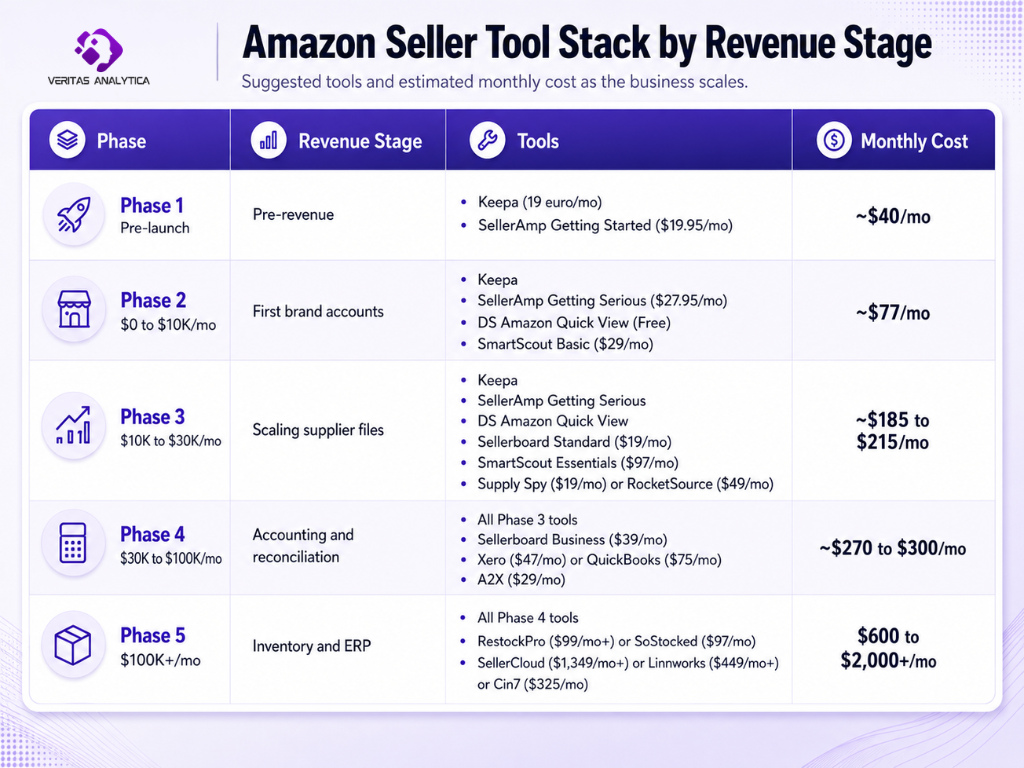
7 Mistakes Wholesale Sellers Make With Their Tool Stack
Mistake 1: Skipping listing, IP, and supplier verification before ordering
Wholesale sellers often dive deep into demand validation and crunching the numbers on margins, but they overlook three crucial checks that can save them from making costly blunders in the business.
- Listing status: Just because a listing appears to be thriving on Keepa does not mean it is in the clear. It could be restricted or gated on Amazon at any moment, or the brand could pull distribution authorization mid-shipment. Ordering inventory for such a listing could mean shelling out cash for stock you cannot legally sell.
- IP risk: Even when a product is completely legitimate, brands often file IP complaints against unauthorized wholesale resellers as a distribution control tactic. Amazon’s account health system treats each complaint as a violation against you, and repeated complaints lead directly to account suspension, sometimes permanent. To protect yourself: secure direct written authorization from the brand or a verified authorized distributor before placing any order, maintain clear invoices and chain-of-custody documentation, and avoid brands known for aggressive distribution control unless you have explicit reseller approval. SmartScout’s seller history charts can reveal brands that enforce distribution aggressively. Check whether third-party sellers appear and disappear in waves across the brand’s top ASINs before any large order.
- Supplier verification: Buying from an unverified or unauthorized source exposes you to counterfeit violations, which can lead to permanent account suspension even when you acted in good faith and the product turned out to be authentic. Direct authorization from the brand or a verified authorized distributor is non-negotiable at any meaningful order size.
Keepa, SmartScout, and SellerAmp validate the opportunity. Verifying listing status in Seller Central, confirming brand authorization in writing, and maintaining supplier documentation prevent the catastrophic mistakes that the data tools cannot catch.
Mistake 2: Skipping a profit calculator at pre-launch
A product that seems profitable based on its selling price and a rough estimate of margins can turn out to be a money loser once you take into account all the inbound fees, FBA fees, referral fees, shipping fees, storage costs and tariffs (if applicable). SellerAmp does the math on all these factors before you make any financial moves.
Mistake 3: Applying a private label tool stack to a wholesale business
When it comes to private label tools, they’re specifically designed for businesses that create their own listings, manage their own keywords, and handle their own advertising campaigns. On the flip side, wholesale sellers don’t do any of that. If you try to use a research suite meant for private label as the backbone of a wholesale operation, you’ll end up paying for features that don’t serve your needs, while missing out on essential tools like brand intelligence, seller tracking, and file scanning that are crucial for wholesale.
Mistake 4: Ignoring the FBA seller count filter in brand research
The number of active FBA sellers on a listing is one of the best indicators of whether a new reseller can compete profitably. But 12 sellers on a listing does not automatically mean aggressive competition. The real question is who those sellers are, how they are priced, what their price history looks like, and what their stock levels suggest about how long they will be on the listing.
There is also a filter trick most sellers miss: set the SmartScout FBA seller count to a minimum of 2 or 3. This filters out private label brands, which typically have a single seller (the brand owner) and do not open wholesale accounts to resellers. SmartScout can filter entire categories on this metric at scale. Wholesale sellers who overlook this filter and rely solely on demand data often find themselves in crowded listings where Buy Box wins are rare and price wars are constant.
Mistake 5: Adding a supplier file scanner too late
At $10K to $15K per month in wholesale revenue, it’s common for sellers to receive a bunch of supplier price lists each month, often packed with hundreds or even thousands of SKUs. Going through these lists manually can eat up hours for each file and can lead to mistakes. That’s where tools like Supply Spy and RocketSource, both pay for themselves on the first supplier file they process. The real cost of waiting to add these tools isn’t just the subscription fee; it’s the hours wasted and the profitable SKUs you miss out on because the research took too long.
Mistake 6: Adding an ERP before the complexity demands it
ERP vendors are heavily targeting wholesale sellers who pull in over $500K a year. But for most sellers at that level, the reality is pretty straightforward: one warehouse, one marketplace, and one business entity. Solutions like SellerCloud, priced at $1,349 a month, and Linnworks, at $449 a month, are designed for operations that juggle three or more fulfillment locations across various channels and legal entities. If you choose to invest in one of these systems just because your revenue hit a certain threshold, rather than because your operations actually require it, you might end up shelling out enterprise-level costs for only about 20% of the features you really need.
Mistake 7: Sourcing on the current price without checking historical lows
Wholesale sellers regularly source based on the current Buy Box price without checking what the listing has actually traded at over the past 90, 180, and 365 days. A stable $24.99 Buy Box this week may have hit $18.50 four months ago when a competitor cleared stock, and nothing stops another seller from doing the same once your inventory lands. Keepa shows three low markers that matter: the 90-day, 180-day, and 365-day lows. The lowest of these is the realistic price floor under competitive pressure, not the current Buy Box.
Two more signals before any order. First, MAP (Minimum Advertised Price) enforcement. If the brand contractually enforces a MAP, that floor is far more reliable than market-driven Buy Box history. Prices dropping below MAP signal unauthorized sellers, and the brand will eventually act to remove them. Confirm MAP terms with the brand or distributor in writing before placing an order. Second, Amazon’s own lowest price. When Amazon is in the Buy Box, third-party FBA sellers can still capture the rotation, but only if the COGS makes them profitable at Amazon’s floor price. A clean current price hides all three risks. Reading Keepa properly means reading the lows, the MAP terms, and the Amazon floor.
The Takeaway
Wholesale is all about the margins. The sellers who come out on top aren’t necessarily the ones with the most tools at their disposal; rather, they’re the ones who have the right tools for the right moment, making purchasing decisions based on complete data instead of just a hunch. This guide gives you the foundation. The rest is all about execution.
Frequently Asked Questions
Q1: Do wholesale Amazon sellers need Helium 10?
No. The core activities of wholesale sourcing do not require keyword research, listing optimization, or PPC automation. Those features are built for private label sellers. Wholesale sellers need brand intelligence, price history, and profit tracking. SmartScout at $29 to $97 per month, serves those needs specifically. The right tool for the right model is the principle, not a verdict on any single platform.
Q2: What is the best tool stack for Amazon wholesale beginners in 2026?
Start with two tools: Keepa (19 euros per month) for price history and demand validation, and SellerAmp Getting Started ($19.95 per month) for per-unit profit calculation and sourcing analysis. Total cost: roughly $40 per month. Both offer free trials. Add DS Amazon Quick View (free) and SmartScout Basic ($29 per month) when you move into active brand sourcing at Phase 2.
Q3: When should a wholesale seller add Sellerboard?
At Phase 3, when sales are active, and you are managing multiple supplier accounts with variable COGS. Sellerboard Standard at $19 per month tracks per-unit margin across every supplier, catches FBA reimbursements, and handles the profit visibility that grows increasingly complex as brand account count rises. Below Phase 3, SellerAmp handles the per-unit profitability calculations needed during sourcing.
Q4: What is SellerAmp used for in wholesale sourcing?
SellerAmp SAS answers the three questions every wholesale buy decision requires: Can I sell it (eligibility, IP issues, hazmat status)? Does it sell (BSR history, estimated sales, competing offers)? Is it profitable (ROI, margin, FBA fees, your landed cost)? It works as a Chrome extension on any website, a web app, and a mobile app. Getting Started costs $19.95 per month with 1,000 lookups. Getting Serious costs $27.95 per month with unlimited lookups, the right tier once supplier file volume grows.
Q5: When should a wholesale seller add accounting software?
At Phase 4, when you cross $30,000 per month in revenue. Below that, Sellerboard handles profit tracking and basic financial visibility adequately. Above $30K per month, add Xero ($47 per month) or QuickBooks Essentials ($75 per month) alongside A2X ($29 per month). A2X pulls Amazon settlement data and posts categorized transactions directly into your accounting software. These two always come as a pair.
Q6: Do Amazon wholesale sellers need an ERP?
Only when operations become genuinely complex across three or more dimensions simultaneously: multi-channel selling, multi-warehouse fulfilment, or multi-entity accounting. Most wholesale sellers under $1M per year have zero to one of these. SellerCloud starts at $1,349 per month, Linnworks at approximately $449 per month, and Cin7 at $325 per month. These are justified by complexity, not by revenue alone.